

Control plane and data plane
A BYOC deployment spans two environments, as shown in the following diagram: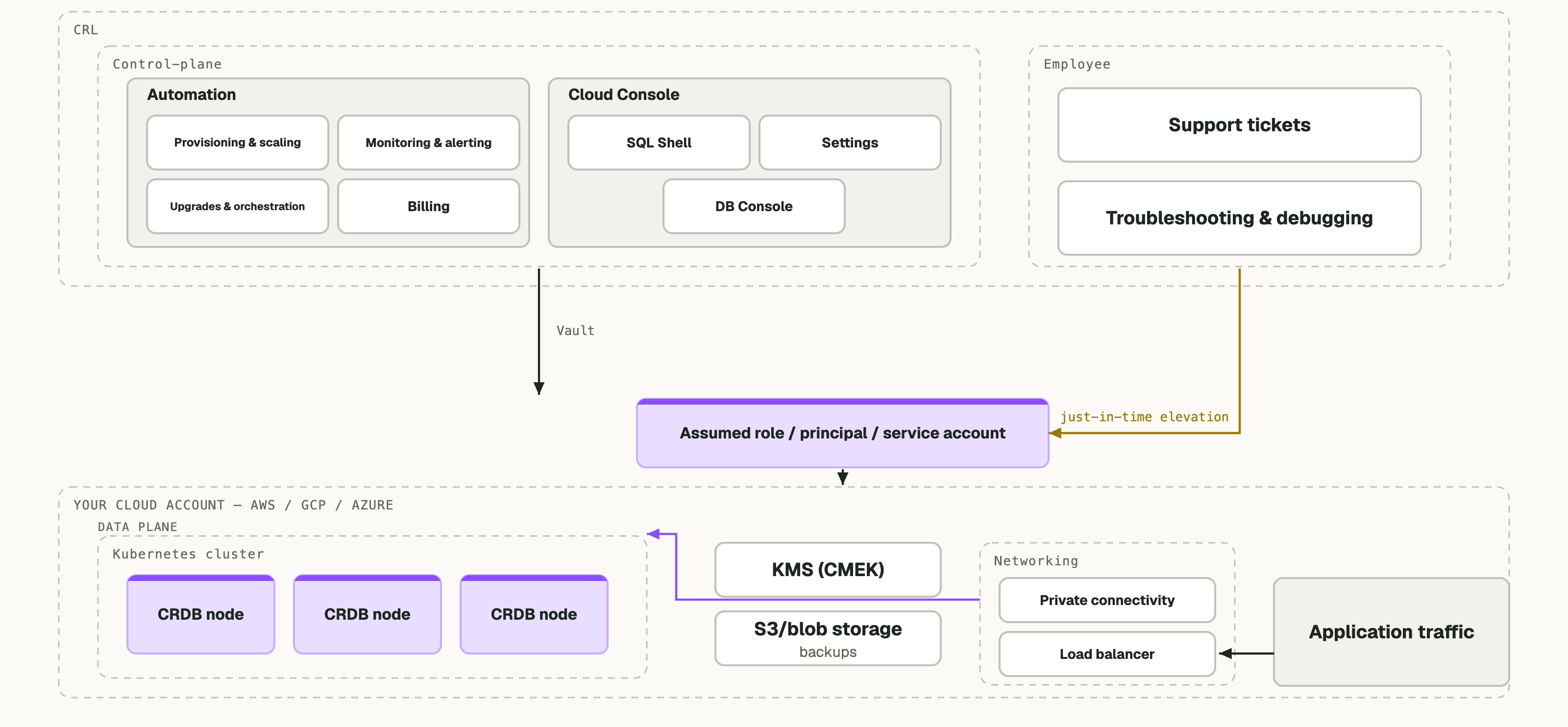
- The data plane runs in your cloud account. The data plane contains everything that stores or serves your data: the CockroachDB nodes, their compute and encrypted storage, the managed Kubernetes cluster that supervises them, the load balancers and private endpoints your applications connect through, the networking configuration, and the storage bucket that holds your backups.
- The control plane runs on Cockroach Labs infrastructure, hosted in the United States. The control plane provisions clusters, applies patches and version upgrades, orchestrates managed backups, monitors cluster health, drives automated healing, and serves the CockroachDB Cloud Console, the , and the .
How Cockroach Labs connects to your account
During setup you create a scoped cross-account identity and grant it to Cockroach Labs: an IAM role on Amazon Web Services (AWS), a service principal on Microsoft Azure, or a service account on Google Cloud Platform (GCP). The control plane assumes that identity and calls your cloud provider’s own API endpoints to manage the resources that make up the cluster. These management API calls travel between Cockroach Labs and the cloud provider’s control plane, not through your network. This design means every action Cockroach Labs takes is an authenticated cloud provider API call, and therefore appears in your own cloud provider audit log. In addition, there is a Tailscale router pod deployed in your Kubernetes cluster. This router is used as a jumpbox by Cockroach Labs engineers for debugging purposes, gated by per-session access controls.Application traffic
Application traffic never transmits through the control plane infrastructure. Your application connects to a load balancer or private endpoint inside your own account, which routes to the CockroachDB nodes in your own account. Cockroach Labs is not involved in this traffic flow, and a Cockroach Labs outage does not interrupt it.What data leaves your cloud account
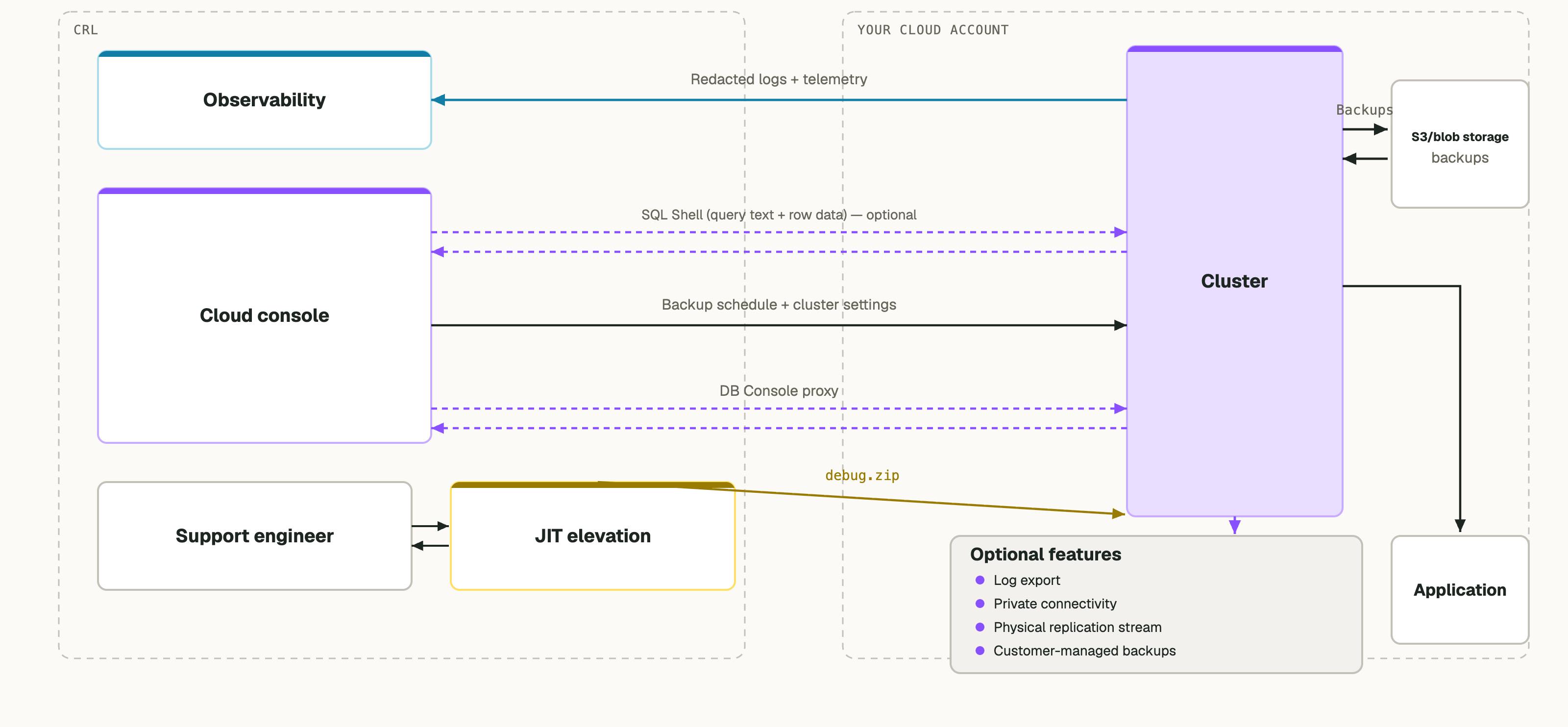
For the detailed field list of what CockroachDB reports, refer to .
The following data does not leave your cloud account:
- Query results.
- Unredacted log content.
- Backups. CockroachDB writes managed backups to a bucket in your own account and encrypts them with a key. You can control this key when using .
- Encryption keys.
Logs
BYOC uses two separate log streams. They differ in how they affect data residency and auditing.- Redacted logs to Cockroach Labs: CockroachDB , then sends them to the Cockroach Labs observability platform over an encrypted connection. Cockroach Labs site reliability engineers (SREs) and support engineers use this stream to operate, monitor, and troubleshoot your cluster. Cockroach Labs aggregates this stream in the United States regardless of which region your cluster runs in. You cannot disable this stream, because it is the mechanism by which Cockroach Labs operates the service.
- Unredacted logs to your own sink: If you configure log export, CockroachDB writes full unredacted logs to a log sink inside your own cloud account: Amazon CloudWatch, Azure Monitor, or Google Cloud Logging. Cockroach Labs does not receive this stream. You control its retention, access, and downstream processing. Refer to .
Metrics
The control plane collects cluster metrics to operate the service and to render the Console. You can additionally export metrics to a monitoring destination in your own account. Refer to .Telemetry
You cannot disable operational telemetry for a BYOC cluster, in whole or in part. Telemetry is the mechanism by which Cockroach Labs provisions, patches, monitors, and supports your cluster, and by which Cockroach Labs delivers the availability commitment. Instead, you have the following controls over telemetry:- CockroachDB redacts log data before it leaves your account.
- For the list of collected fields, refer to .
- You can export unredacted and to a destination in your own account.
- The Cloud Console SQL Shell: The in the CockroachDB Cloud Console connects to your cluster through the control plane. When a user in your organization runs a statement there, the statement text and its results transit Cockroach Labs infrastructure.
- Console pages that display schema and query fingerprints: The Console displays database, table, index, and column names, and the SQL Activity and Insights pages display normalized statement fingerprints, which omit literal values but retain object names.
- Authorized support investigation: When you open a support case that requires live investigation, a Cockroach Labs engineer may need SQL-level access to diagnose the issue. This requires just-in-time elevation with a recorded justification, is time-bounded, and appears in your own cloud provider audit log.
Availability during a control plane outage
Because the control plane is not in the data path, a control plane outage does not interrupt your database. The following are unaffected during a control plane outage:- All SQL traffic. Nodes continue serving reads and writes.
- Raft consensus and replication, which run inside the CockroachDB process on the nodes themselves.
- Execution of backup jobs that are already scheduled.
- Recovery from a node failure. CockroachDB upreplicates data through Raft, and the in-account Kubernetes operator replaces the failed pod. This requires no control plane involvement.
- The CockroachDB Cloud Console.
- The Cloud API and the Terraform provider.
- Operations that change cluster size or configuration, such as scaling, upgrades, and new provisioning.