

Overview
The MovR example consists of the following:- The
movrdataset, which contains rows of data that populate tables in themovrdatabase. Themovrdataset is built intocockroach demoandcockroach workload. - The MovR application, a fully-functional vehicle-sharing application, written in Python. All of MovR application source code is open-source, and available on the movr GitHub repository.
The movr database
The six tables in the movr database store user, vehicle, and ride data for MovR:
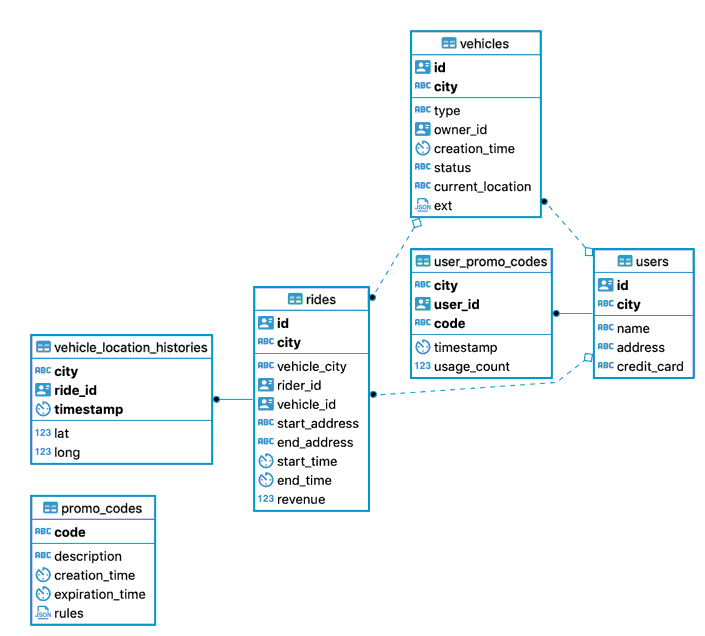
Generating schemas and data for MovR
You can use thecockroach demo and cockroach workload commands to load the movr database and dataset into a CockroachDB cluster.
cockroach demo opens a SQL shell to a temporary, in-memory cluster. To open a SQL shell to a demo cluster with the movr database preloaded and set as the current database, use the following command:
cockroach workload loads sample datasets and workloads into running clusters. To load the movr database and some sample data into a running cluster, do the following:
- Start a secure or insecure local cluster.
-
Use
cockroach workloadto load themovrdataset: -
Use
cockroach sqlto open an interactive SQL shell and setmovras the current database:
How the MovR application works
The workflow for MovR is as follows:-
A user loads the app and sees the 25 closest vehicles.
For example:
-
The user signs up for the service.
For example:
-
In some cases, the user adds their own vehicle to share.
For example:
-
More often, the user reserves a vehicle and starts a ride, applying a promo code, if available and valid.
For example:
-
During the ride, MovR tracks the location of the vehicle.
For example:
-
The user ends the ride and releases the vehicle.
For example:
Extended examples
For a tutorial on running MovR against a multi-region cluster, using two important multi-region data topologies to get very low latency reads and writes, see Low Latency, Multi-Region Deployment.Develop and deploy a global application
For a tutorial on developing and deploying a globally-available web application for MovR, use the following docs:- MovR: A Global Application Use-case
- Create a Multi-region Database Schema
- Set up a Virtual Environment for Developing Global Applications
- Develop a Global Application
- Deploy a Global Application